 Elsa Addison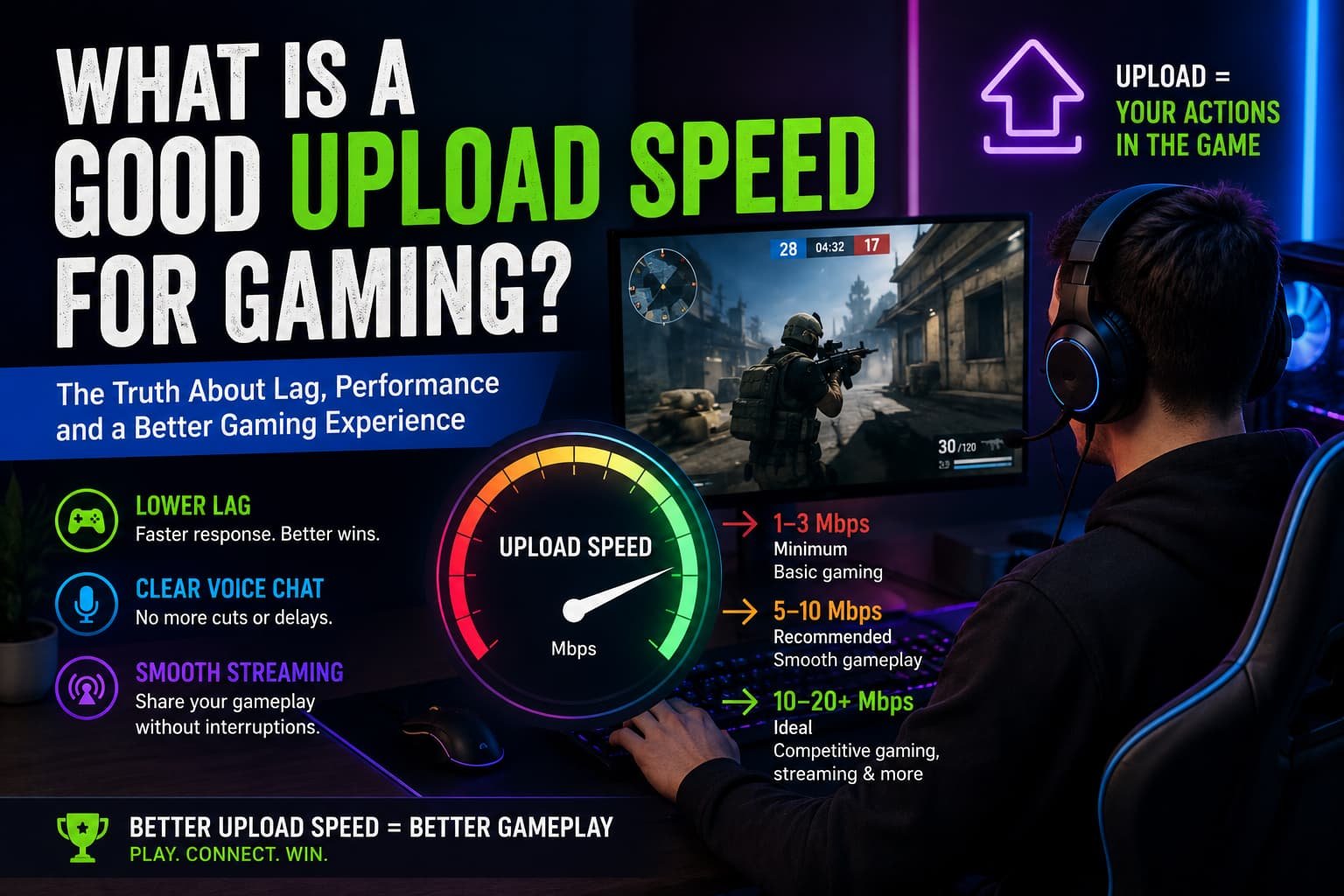
If you’ve ever been in the middle of a competitive match and suddenly experienced lag, delayed actions, or random disconnects, you’ve probably wondered whether your internet speed is to blame. Most gamers focus on download speed, but after years of online gaming, I’ve learned that upload speed can be just as important in certain situations.
I remember troubleshooting constant lag during ranked matches a few years ago. My download speed looked fantastic—well over 100 Mbps—so I assumed my internet was more than capable. Yet I kept experiencing voice chat issues, packet loss, and occasional disconnects. After digging deeper, I discovered my upload speed was the real bottleneck.
In this guide, I’ll explain what a good upload speed for gaming actually is, how much you really need, and when upload speed starts affecting your gaming experience. Whether you’re a casual gamer, competitive esports player, or streamer, understanding upload speed can help you build a smoother online experience.
Why Upload Speed Matters for Gaming
Before discussing specific numbers, it’s important to understand what upload speed does.
Upload speed measures how quickly your device sends data to the internet.
While download speed handles incoming information like game assets, updates, and video streams, upload speed is responsible for sending information from your device to game servers.
Examples include:
- Player movements
- Voice chat data
- Matchmaking requests
- Game actions and commands
- Livestream broadcasts
- Cloud saves
Every time you move your character, fire a weapon, or communicate with teammates, your device uploads data.
Without sufficient upload speed, these actions may experience delays.
Read More: What Is the Highest Paid Sport in the World?
What Is Considered a Good Upload Speed for Gaming?
Based on my experience and industry recommendations, here’s a simple guideline:
Minimum Upload Speed
- 1–3 Mbps
This is generally enough for basic online gaming.
Many popular games such as:
- Fortnite
- Minecraft
- Rocket League
- EA Sports FC
- Call of Duty
can function reasonably well at this level.
However, if multiple devices are using your network simultaneously, problems can occur.
Recommended Upload Speed
- 5–10 Mbps
For most gamers, this range offers a comfortable experience.
It supports:
- Multiplayer gaming
- Voice chat
- Stable connections
- Multiple connected devices
This is the sweet spot I usually recommend for average households.
Ideal Upload Speed
- 10–20 Mbps or higher
This range is excellent for:
- Competitive gaming
- Simultaneous streaming
- Content creation
- Large households
- Cloud gaming services
If you’re streaming gameplay on platforms like Twitch or uploading content to YouTube, higher upload speeds become increasingly valuable.
Upload Speed vs Download Speed for Gaming
One of the biggest misconceptions I encounter is that gaming requires extremely high download speeds.
In reality, most online games use surprisingly little bandwidth.
What matters more is:
Low Latency (Ping)
Ping measures how quickly data travels between your device and the game server.
Lower is better.
Generally:
- Under 20 ms = Excellent
- 20–50 ms = Very good
- 50–100 ms = Playable
- Above 100 ms = Noticeable lag
Stable Connection
Consistency often matters more than raw speed.
I’d rather play on a stable 50 Mbps connection than an unstable 500 Mbps connection.
Upload Quality
When upload speed is insufficient, game servers may receive delayed information from your device, causing issues such as:
- Rubber-banding
- Teleporting characters
- Voice chat lag
- Match disconnects
How Much Upload Speed Do Different Gamers Need?
Casual Gamers
If you mostly play:
- Single-player games
- Occasional multiplayer matches
- Mobile games
A 3–5 Mbps upload speed is usually enough.
Competitive Gamers
Players involved in ranked or esports-style matches should aim for:
- 5–10 Mbps minimum
Games such as:
- Valorant
- Counter-Strike 2
- Apex Legends
- Rainbow Six Siege
benefit greatly from stable uploads and low latency.
Streamers
This is where upload speed becomes critical.
In my experience, streaming is often what exposes internet limitations.
Typical streaming requirements:
- 720p stream: 3–5 Mbps upload
- 1080p stream: 6–10 Mbps upload
- Higher quality streams: 10+ Mbps upload
If you’re gaming and streaming simultaneously, a 15–20 Mbps upload speed provides significantly more breathing room.
Real-World Gaming Example
A friend recently upgraded from a basic DSL connection with 1 Mbps upload speed to a fiber connection offering 20 Mbps upload.
Interestingly, his download speed improvement wasn’t what he noticed most.
Instead, he experienced:
- Better voice communication
- Fewer disconnects
- More reliable matchmaking
- Smoother streaming
This demonstrates how upload speed can directly influence gaming quality even when download speeds seem adequate.
Common Gaming Problems Caused by Poor Upload Speed
1. Voice Chat Cutting Out
Applications such as:
- Discord
- Xbox Party Chat
- PlayStation Voice Chat
depend heavily on upload performance.
Insufficient upload speed can cause robotic voices, delays, and dropped conversations.
2. Rubber-Banding
Rubber-banding occurs when your character appears to jump backward or teleport unexpectedly.
This often happens because the server isn’t receiving your movement data consistently.
3. Match Disconnects
Games require constant communication between your device and servers.
Weak uploads can interrupt that communication.
4. Poor Streaming Quality
When upload speed falls below streaming requirements, viewers may experience:
- Buffering
- Pixelation
- Stream drops
How to Test Your Upload Speed
I recommend testing periodically, especially if you notice gaming issues.
Reliable testing tools include:
Run multiple tests at different times of day to identify consistency issues.
One test alone doesn’t always tell the full story.
Ways to Improve Upload Speed for Gaming
Use a Wired Ethernet Connection
This is one of the easiest upgrades.
In my testing, Ethernet almost always delivers:
- Lower latency
- Better stability
- Reduced packet loss
compared to Wi-Fi.
Upgrade Your Router
Older routers can struggle with modern gaming demands.
Newer Wi-Fi 6 and Wi-Fi 6E routers often improve network efficiency.
Brands frequently recommended by gamers include:
- ASUS
- TP-Link
- Netgear
- Linksys
Limit Background Uploads
Cloud backups, software updates, and file syncing services can consume valuable upload bandwidth.
Check for:
- Google Drive syncing
- Dropbox uploads
- OneDrive backups
- Automatic updates
Upgrade Your Internet Plan
Sometimes the simplest solution is upgrading to a plan with better upload capacity.
Fiber internet providers often offer significantly faster upload speeds than traditional cable or DSL services.
Does Fiber Internet Improve Gaming?
In my experience, yes.
Fiber connections typically provide:
- Symmetrical speeds
- Lower latency
- Greater consistency
For example:
- 300 Mbps download
- 300 Mbps upload
This is a major advantage over many cable plans that offer high download speeds but limited uploads.
While fiber isn’t mandatory for gaming, it often provides the most reliable online experience.
Quick Tips for Better Gaming Performance
If you want smoother online gaming, focus on these priorities:
- Prioritize low ping over massive speed numbers.
- Aim for at least 5 Mbps upload speed.
- Use Ethernet whenever possible.
- Limit background uploads.
- Upgrade outdated networking equipment.
- Consider fiber internet if available.
- Test your connection regularly.
Frequently Asked Questions
Is 10 Mbps upload speed good for gaming?
Yes. For most gamers, 10 Mbps upload speed is more than enough for multiplayer gaming, voice chat, and even light streaming.
Is 1 Mbps upload speed enough for gaming?
It can work for basic online gaming, but it leaves very little room for other activities. Voice chat, multiple users, and streaming may cause problems.
Does upload speed affect ping?
Not directly. Ping measures latency, while upload speed measures bandwidth. However, a saturated upload connection can indirectly increase lag and worsen overall gaming performance.
Final Thoughts
When people ask, “What is a good upload speed for gaming?” my answer is usually simple: aim for at least 5–10 Mbps upload speed for a smooth gaming experience, and 10–20 Mbps or more if you stream or play competitively.
After testing different internet setups over the years, I’ve learned that upload speed isn’t something gamers should ignore. While download speed often gets all the attention, stable uploads are what help keep your gameplay responsive, your voice chat clear, and your connection reliable.
The good news is that most modern internet plans can easily meet gaming requirements. Focus on connection quality, low latency, and consistent upload performance, and you’ll likely notice a bigger improvement than simply chasing the highest download speed available.


 Mark Jones