 Elsa Addison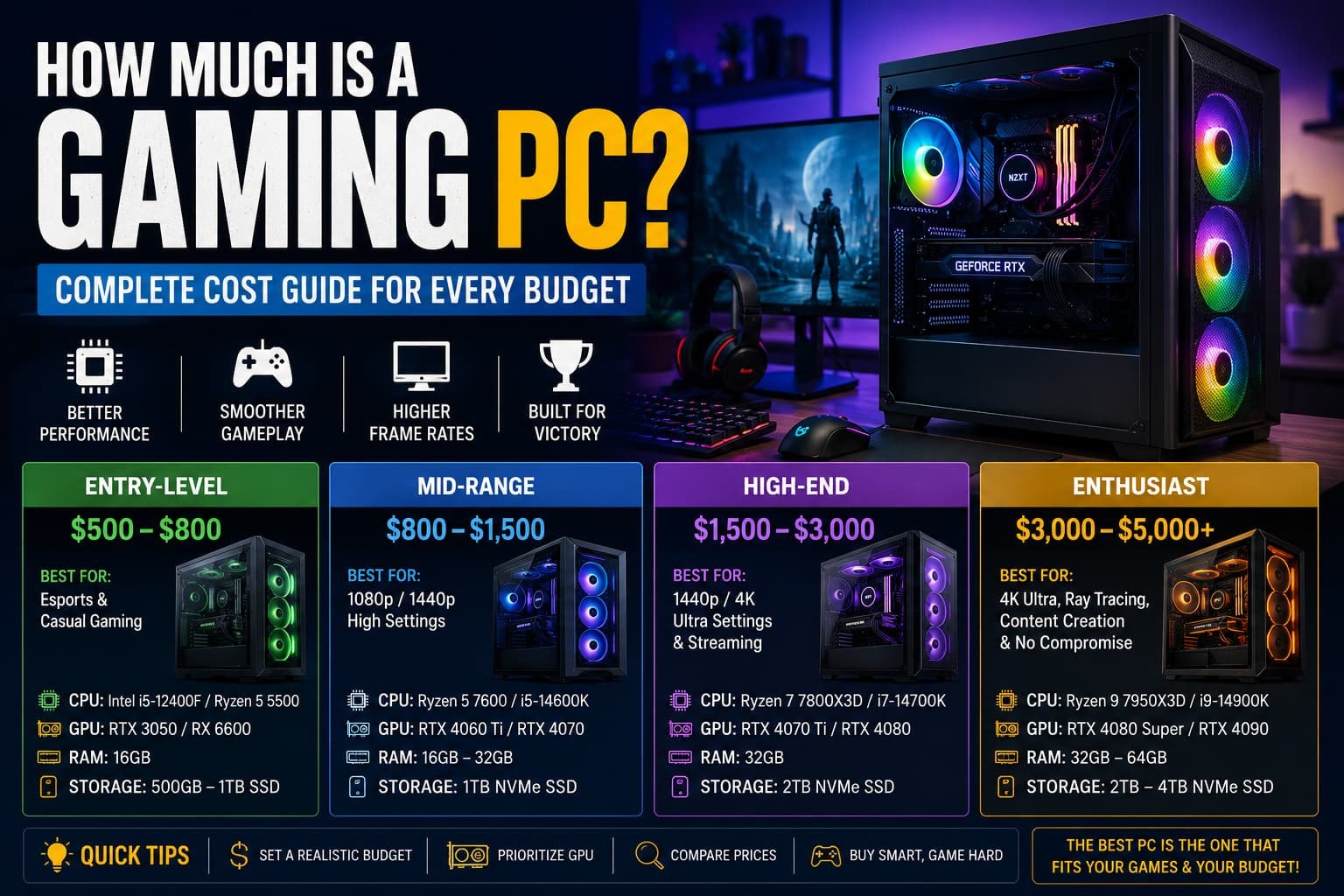
When I started researching gaming PCs, I assumed there was one simple answer to the question: “How much is a gaming PC?”
I quickly learned that wasn’t the case.
One friend proudly showed me a gaming setup he built for around $700. Another spent nearly $4,000 on a premium gaming machine with RGB lighting, liquid cooling, and enough power to run virtually any game at maximum settings. Both called their systems “gaming PCs”—and technically, they were both right.
In my experience, the cost of a gaming PC depends heavily on what games you play, your performance expectations, and whether you’re buying prebuilt or building your own.
The good news?
You don’t need to spend thousands of dollars to enjoy modern games.
This guide breaks down exactly how much a gaming PC costs, what influences the price, and how to get the best value for your budget.
Read More: What Is a Good Upload Speed for Gaming?
How Much Is a Gaming PC?
The short answer is:
- Entry-level gaming PC: $500–$800
- Mid-range gaming PC: $800–$1,500
- High-end gaming PC: $1,500–$3,000+
- Enthusiast gaming PC: $3,000–$5,000+
The right budget depends on:
- Resolution (1080p, 1440p, 4K)
- Game type
- Streaming needs
- Future upgrades
- Graphics settings
Let’s look at each category more closely.
Entry-Level Gaming PCs ($500–$800)
Best for Casual and Esports Gamers
If you’re mainly playing:
- Fortnite
- Valorant
- Rocket League
- League of Legends
- Minecraft
- Counter-Strike 2
An entry-level gaming PC is often enough.
Typical components include:
Processor (CPU)
Examples:
- AMD Ryzen 5 5600G
- AMD Ryzen 5 5500
- Intel Core i5-12400F
Graphics Card (GPU)
Examples:
- AMD Radeon RX 6600
- Intel Arc A580
- NVIDIA RTX 3050
Memory
- 16GB RAM
Storage
- 500GB–1TB SSD
In my experience, this price range offers the best value for gamers who primarily play competitive online titles.
You won’t necessarily get ultra settings in every game, but performance is usually excellent at 1080p.
Mid-Range Gaming PCs ($800–$1,500)
The Sweet Spot for Most Gamers
This is where many gamers find the perfect balance between cost and performance.
I often recommend this range because it delivers:
- High frame rates
- Better graphics quality
- Longer lifespan before upgrades
Popular games run exceptionally well:
- Call of Duty
- Apex Legends
- Elden Ring
- Cyberpunk 2077
- Hogwarts Legacy
- Baldur’s Gate 3
Typical hardware includes:
CPU Options
- AMD Ryzen 7 7700X
- AMD Ryzen 5 7600
- Intel Core i5-14600K
GPU Options
- NVIDIA GeForce RTX 4060 Ti
- NVIDIA RTX 4070
- AMD Radeon RX 7700 XT
RAM
- 16GB to 32GB DDR5
Storage
- 1TB NVMe SSD
When I tested systems in this range, I found they offered the best “future-proofing” without dramatically increasing costs.
High-End Gaming PCs ($1,500–$3,000)
Built for Serious Gamers and Creators
This category targets gamers who want:
- Maximum settings
- High refresh rates
- 1440p gaming
- 4K gaming
- Streaming capabilities
These systems often include:
CPUs
- AMD Ryzen 9 9900X
- AMD Ryzen 9 9950X
- Intel Core Ultra 9 series
GPUs
- NVIDIA RTX 5070 Ti
- NVIDIA RTX 5080
- AMD Radeon RX 8900 XT
Memory
- 32GB RAM
Storage
- 2TB SSD or larger
A friend recently upgraded to an RTX 5080-based gaming rig, and the difference was immediately noticeable. Games loaded faster, ray tracing looked incredible, and frame rates remained smooth even at ultra settings.
Of course, the jump in performance comes with a significant increase in cost.
Enthusiast Gaming PCs ($3,000–$5,000+)
For Those Who Want the Absolute Best
Let’s be honest.
This is where gaming starts becoming a hobby and a passion project.
These PCs often include:
- Custom liquid cooling
- Premium RGB components
- NVIDIA RTX 5090-class graphics
- Massive storage configurations
- High-end motherboards
These systems can handle:
- 4K Ultra gaming
- VR gaming
- Content creation
- AI workloads
- Professional streaming
While they’re impressive, most gamers simply don’t need this level of hardware.
What Components Affect Gaming PC Cost the Most?
Graphics Card (GPU)
The GPU is usually the most expensive part.
Examples:
- Budget GPU: $200–$350
- Mid-range GPU: $400–$700
- High-end GPU: $800–$2,000+
If gaming performance is your priority, this is where most of your budget should go.
Processor (CPU)
The CPU affects:
- Frame rates
- Multitasking
- Streaming
- Productivity tasks
Expect to spend:
- Budget: $100–$200
- Mid-range: $200–$400
- Premium: $500+
RAM
For gaming:
- 16GB = ideal minimum
- 32GB = recommended for high-end builds
RAM costs have become relatively affordable compared to previous years.
Storage
Modern games are huge.
Some titles exceed 100GB each.
Most gamers should start with:
- 1TB SSD minimum
Prebuilt vs Building Your Own Gaming PC
Buying a Prebuilt Gaming PC
Popular brands include:
- Alienware
- MSI
- ASUS
- HP
- Lenovo
Advantages:
- Ready to use
- Warranty included
- No assembly required
Disadvantages:
- More expensive
- Less customization
Building Your Own Gaming PC
Advantages:
- Better value
- Full customization
- Easier future upgrades
Disadvantages:
- Learning curve
- Assembly required
When I built my first gaming PC, I was nervous about making mistakes. Surprisingly, the process was easier than expected thanks to YouTube tutorials and PC-building communities.
I ended up saving several hundred dollars compared to a similar prebuilt system.
Hidden Costs Many Gamers Forget
The PC itself isn’t always the full expense.
You’ll likely need:
Gaming Monitor
Price ranges:
- Budget: $100–$200
- Mid-range: $250–$500
- Premium: $600+
Keyboard and Mouse
Gaming peripherals can cost:
- Budget setup: $50–$100
- Premium setup: $200–$500+
Popular brands include:
- Logitech
- Razer
- SteelSeries
Headset
Expect:
- $30–$250+
Operating System
A Windows license may add another expense if it’s not included.
How Much Should You Spend Based on Your Gaming Goals?
Casual Gaming
Recommended budget:
$600–$900
Perfect for:
- Minecraft
- Roblox
- Fortnite
- Valorant
Competitive Gaming
Recommended budget:
$900–$1,500
Perfect for:
- Counter-Strike 2
- Apex Legends
- Rainbow Six Siege
AAA Gaming
Recommended budget:
$1,200–$2,000
Perfect for:
- Cyberpunk 2077
- Starfield
- Red Dead Redemption 2
4K Gaming
Recommended budget:
$2,000–$4,000+
Perfect for:
- Ultra settings
- Ray tracing
- High refresh rates
Common Mistakes When Buying a Gaming PC
Overspending on RGB
RGB lighting looks cool.
But it doesn’t improve frame rates.
Prioritize performance components first.
Buying Too Little Storage
Many modern games exceed 100GB.
A 500GB drive fills up surprisingly fast.
Ignoring Cooling
Better cooling can improve system longevity and performance.
Chasing the Absolute Latest Hardware
The newest graphics card isn’t always the best value.
Last-generation hardware often delivers excellent performance at lower prices.
Quick Tips for Saving Money on a Gaming PC
- Watch seasonal sales.
- Consider previous-generation GPUs.
- Build your own system if possible.
- Prioritize GPU performance.
- Start with 16GB RAM.
- Upgrade gradually.
- Compare multiple retailers.
Frequently Asked Questions
Is $1,000 enough for a gaming PC?
Yes. A $1,000 gaming PC can comfortably handle most modern games at 1080p and even some 1440p gaming with excellent performance.
Can I get a gaming PC for under $500?
It’s possible, especially with used components or entry-level hardware, but performance limitations will be noticeable in demanding games.
Is building a gaming PC cheaper than buying one?
Usually, yes. Building your own gaming PC often provides better hardware for the same budget, though pricing differences vary depending on market conditions.
Final Thoughts
So, how much is a gaming PC?
The real answer is that it depends on your goals.
For most gamers, a budget between $800 and $1,500 offers the best combination of performance, value, and future-proofing. Casual players can spend less, while enthusiasts chasing 4K gaming and maximum settings may invest significantly more.
In my experience, the smartest approach isn’t buying the most expensive gaming PC—it’s buying the one that matches how you actually play. Focus on the games you enjoy, set a realistic budget, and prioritize performance over flashy extras.
A well-planned gaming PC can provide years of entertainment without breaking the bank.


 Mark Jones