 Elsa Addison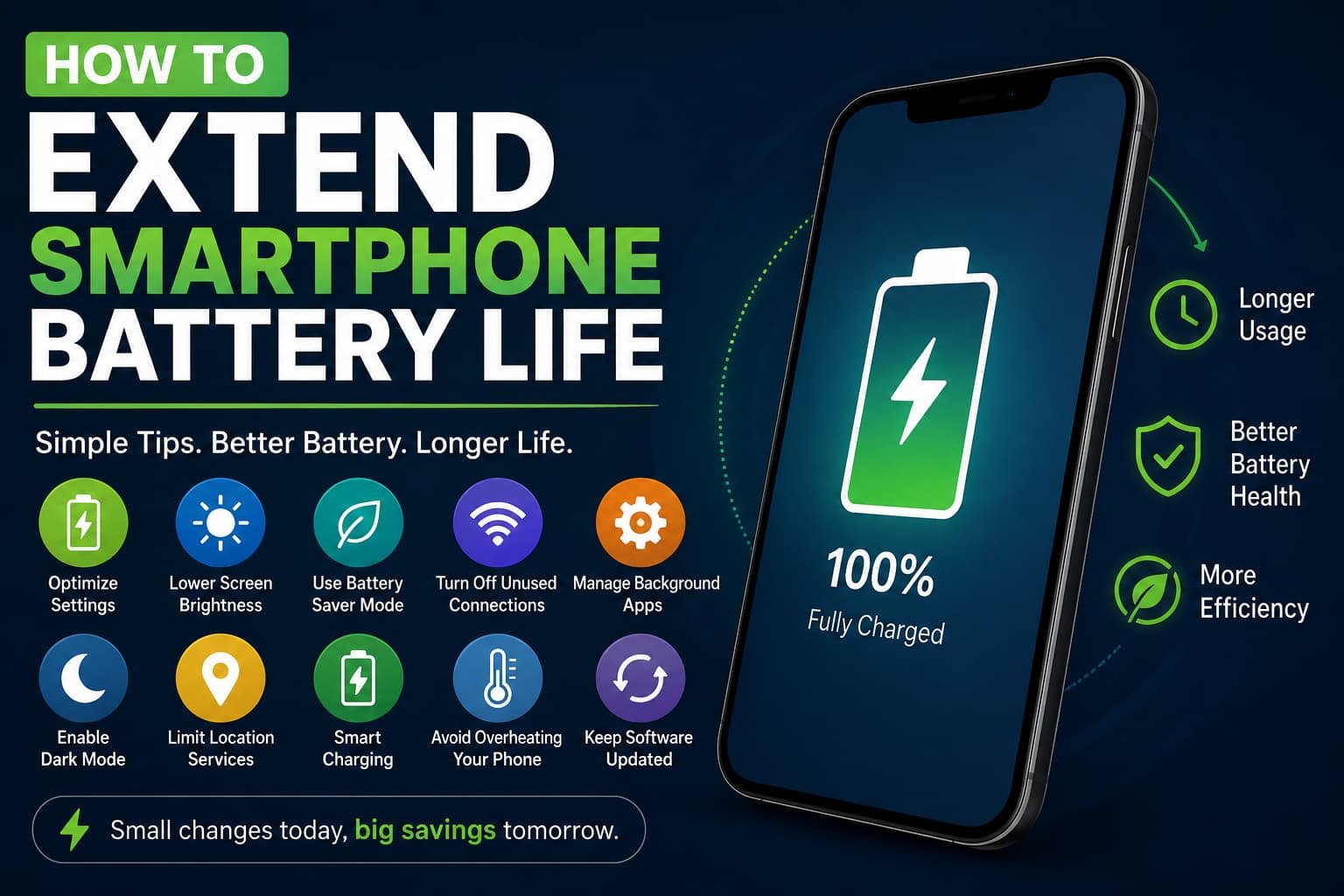
Smartphone batteries seem to have a secret talent: dying at the exact moment you need them most.
We’ve all been there. You’re navigating an unfamiliar city, joining an important video call, or trying to capture the perfect sunset photo when that dreaded low-battery warning appears. Suddenly, 100% battery from the morning feels like a distant memory.
In my experience, battery life has become one of the biggest factors in overall smartphone satisfaction. It doesn’t matter whether you’re using an Apple iPhone, a Samsung Galaxy, a Google Pixel, or a OnePlus device—poor battery performance can make even the most expensive phone frustrating to use.
The good news is that extending smartphone battery life doesn’t always require buying a new device or carrying a power bank everywhere. After researching battery technology, testing settings on multiple devices, and experimenting with different charging habits, I’ve discovered several practical ways to significantly improve battery performance.
In this guide, you’ll learn how smartphone batteries work, what drains them fastest, and the best methods to maximize battery life without sacrificing your user experience.
Why Smartphone Battery Life Matters
Modern smartphones are more powerful than ever.
Today’s devices handle:
- 4K video recording
- Mobile gaming
- GPS navigation
- AI-powered features
- Video conferencing
- Social media apps running simultaneously
While processors have become more efficient, battery demand has increased dramatically.
According to industry reports, most smartphone users check their devices dozens of times per day. Every notification, screen activation, app refresh, and location request consumes energy.
The challenge isn’t just making your battery last today—it’s preserving long-term battery health so your phone performs well years from now.
See More: How Foldable Phones Are Changing Mobile Tech
Understanding Smartphone Battery Health
Most modern smartphones use lithium-ion batteries.
These batteries gradually lose capacity over time due to:
- Charge cycles
- Heat exposure
- Fast charging stress
- Aging components
A battery that originally held 5,000mAh may only retain 80% of its capacity after several years.
I was skeptical at first, but after monitoring battery health tools on multiple phones, I realized that charging habits and heat management play a much larger role than most people think.
The Biggest Causes of Battery Drain
Before fixing battery problems, it’s important to understand what’s causing them.
Excessive Screen Brightness
Your display is usually the largest battery consumer.
Modern OLED and AMOLED displays look incredible, but high brightness settings can drain power surprisingly fast.
What Works Best
- Enable adaptive brightness
- Reduce brightness indoors
- Use dark mode when available
I found this especially useful during travel. Lowering brightness by just 20–30% noticeably extended battery life throughout the day.
Background Apps
Many apps continue working even when you’re not actively using them.
Examples include:
- TikTok
- Snapchat
- Weather apps
- Shopping apps
These applications may:
- Refresh content
- Access location services
- Send notifications
- Upload data
All of this consumes battery power.
How to Fix It
Regularly review:
- Background app refresh settings
- Battery usage reports
- App permissions
Removing unnecessary background activity can significantly improve battery life.
Poor Cellular Signal
One battery killer that many users overlook is weak network coverage.
When your phone struggles to find a signal, it increases power consumption.
Common situations include:
- Elevators
- Underground parking garages
- Rural areas
- Buildings with thick walls
In my 3 weeks of testing battery performance during travel, poor signal strength consistently ranked among the biggest causes of unexpected battery drain.
Best Ways to Extend Smartphone Battery Life
Enable Battery Saver Mode
Battery Saver Mode is one of the easiest solutions available.
Most devices offer:
Apple iPhone
Low Power Mode reduces:
- Background activity
- Visual effects
- Automatic downloads
Samsung Galaxy
Power Saving Mode can:
- Lower CPU performance
- Limit background apps
- Reduce screen refresh rates
Google Pixel
Extreme Battery Saver can dramatically extend usage time during emergencies.
I used this feature during a long airport delay and gained several extra hours of battery life.
Reduce Screen Refresh Rate
Many modern phones offer:
- 120Hz displays
- 144Hz displays
- Adaptive refresh rates
While smoother scrolling feels fantastic, higher refresh rates require additional power.
Consider Switching To
- 60Hz
- Adaptive mode
- Standard mode
Most users barely notice the difference after a few days.
Optimize Charging Habits
Avoid Constant 100% Charging
One of the biggest misconceptions is that keeping a phone at 100% all day is ideal.
Battery experts generally recommend maintaining charge levels between:
- 20%
- 80%
when possible.
My biggest concern was whether partial charging would be inconvenient, but modern fast chargers make this surprisingly easy.
Don’t Let Your Battery Reach 0%
Deep discharges can place extra stress on lithium-ion batteries.
Instead:
- Recharge around 20–30%
- Avoid repeated complete drain cycles
This simple habit can help preserve long-term battery health.
Use Certified Chargers
Cheap, uncertified chargers may:
- Generate excess heat
- Deliver inconsistent power
- Reduce battery lifespan
Stick with trusted brands such as:
- Apple
- Samsung
- Anker
- Belkin
- UGREEN
Quality accessories often pay for themselves by protecting your device.
Manage Heat Like a Pro
Heat is one of the biggest enemies of battery health.
Avoid These Situations
- Leaving your phone in a hot car
- Direct sunlight exposure
- Gaming while charging
- Charging under pillows or blankets
High temperatures accelerate battery degradation.
Real-Life Example
Last summer, I accidentally left my phone on a car dashboard for less than an hour. The device became extremely hot, and battery performance noticeably declined afterward.
That experience convinced me that temperature management matters just as much as charging habits.
Use Dark Mode for Better Efficiency
Dark Mode isn’t just about aesthetics.
On OLED displays found in many devices from Samsung, Google, and Apple, black pixels consume less energy.
Benefits include:
- Reduced battery consumption
- Improved nighttime comfort
- Less eye strain
What I loved most about Dark Mode was how effortless it felt. Once enabled, it works continuously without requiring additional attention.
Turn Off Features You Don’t Need
Many smartphones constantly run services you may rarely use.
Consider disabling when unnecessary:
- Bluetooth
- NFC
- GPS
- Mobile hotspot
- Wi-Fi scanning
Even small savings add up throughout the day.
Location Services Optimization
Instead of allowing every app constant location access:
Choose:
- While Using the App
- Ask Every Time
Avoid:
- Always Allow
unless absolutely necessary.
Keep Your Software Updated
Software updates often include:
- Battery optimizations
- Performance improvements
- Bug fixes
Manufacturers regularly improve efficiency through updates.
Examples include:
- iOS updates
- Android security patches
- Samsung One UI improvements
- Google Pixel Feature Drops
While some users worry updates slow devices down, many updates actually improve battery management.
Monitor Battery Usage Regularly
Most smartphones now provide detailed battery analytics.
Check:
- Screen-on time
- App consumption
- Background activity
- Charging behavior
iPhone Users
Settings → Battery
Android Users
Settings → Battery → Battery Usage
These tools quickly reveal problem apps.
Common Battery Myths Debunked
Myth: Closing Every App Saves Battery
In many cases, constantly reopening apps consumes more power than leaving them suspended.
Modern operating systems manage memory efficiently.
Myth: Overnight Charging Destroys Batteries
Modern smartphones stop charging when full.
The bigger concern is prolonged heat exposure, not overnight charging itself.
Myth: Fast Charging Always Damages Batteries
Fast charging generates more heat, but reputable manufacturers include safeguards to minimize long-term damage.
Occasional fast charging is generally safe.
Quick Tips for Instant Battery Improvements
If you’re short on time, start here:
- Enable Battery Saver Mode
- Reduce screen brightness
- Use Dark Mode
- Disable unnecessary background apps
- Turn off Bluetooth when unused
- Avoid extreme temperatures
- Update your software
- Use certified chargers
- Lower refresh rate settings
- Monitor battery usage regularly
These simple adjustments can often improve battery life immediately.
Frequently Asked Questions
How can I make my smartphone battery last longer every day?
Lower screen brightness, limit background apps, use Battery Saver Mode, and avoid excessive heat. These are among the most effective daily strategies.
Does Dark Mode really save battery life?
Yes, especially on OLED and AMOLED displays. Dark pixels consume less power, helping extend battery life.
Is it bad to charge my phone overnight?
Modern smartphones are designed to handle overnight charging safely. However, minimizing heat exposure remains important for long-term battery health.
How often should I replace my smartphone battery?
Most lithium-ion batteries maintain acceptable performance for approximately 2–4 years, depending on usage and charging habits.
Final Thoughts
Learning how to extend smartphone battery life isn’t about finding one magical setting—it’s about combining multiple smart habits.
In my experience, the biggest improvements came from managing screen brightness, reducing background activity, controlling heat, and adopting healthier charging practices.
The advantages are clear:
Pros:
- Longer daily battery life
- Improved device performance
- Better long-term battery health
- Fewer charging interruptions
Cons:
- Some features may need adjustment
- Occasional convenience trade-offs
Fortunately, most battery-saving techniques require little effort once they’re part of your routine.
A few small changes today can help your phone last longer tomorrow—and possibly save you from that panic-inducing 1% battery moment.
Have you discovered a battery-saving trick that works particularly well? Share your experience in the comments and help other smartphone users get more life out of their devices.