 Elsa Addison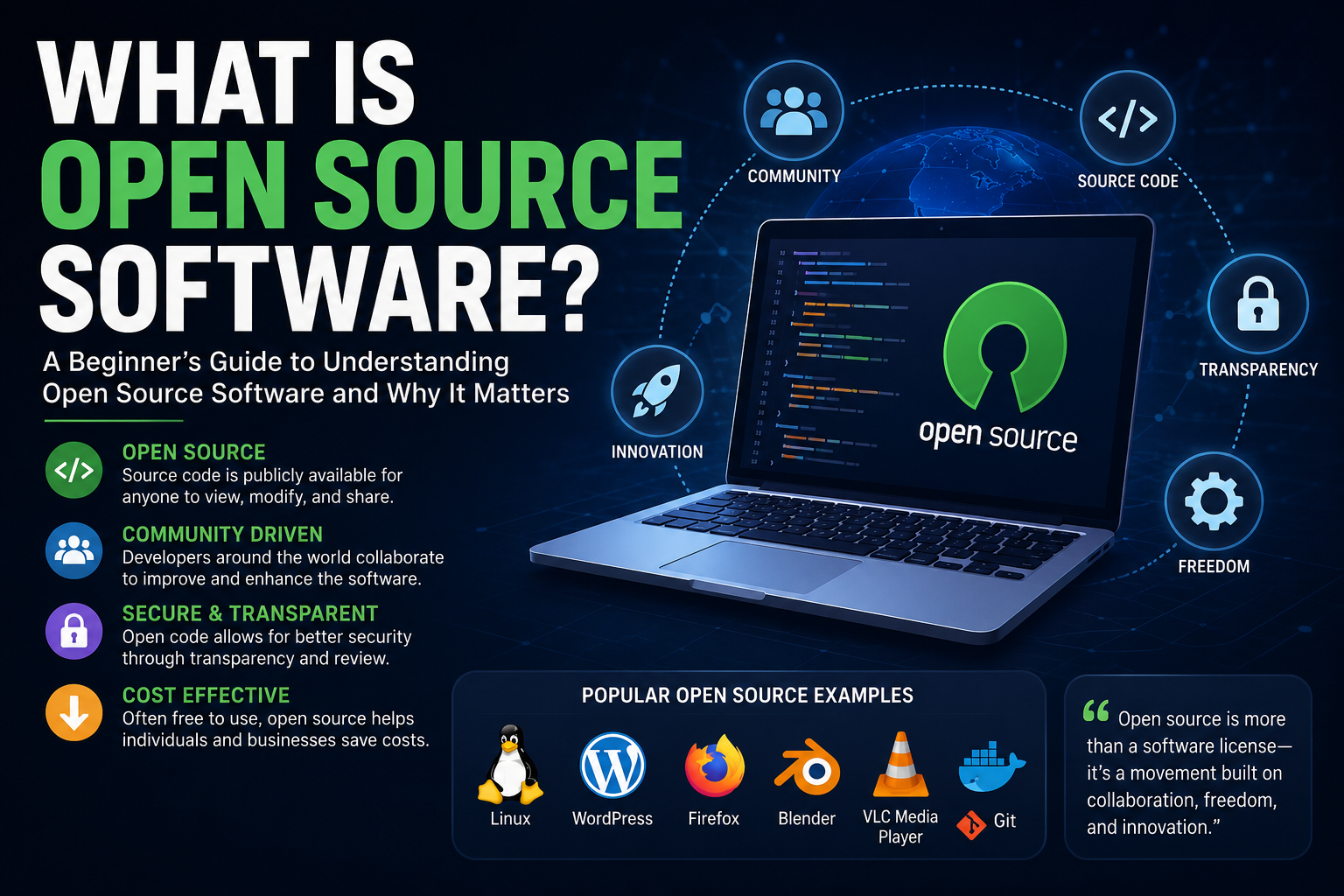
A few years ago, I was troubleshooting a website issue late at night. After digging through forums, documentation, and tutorials, I finally solved the problem using a tool I had downloaded for free.
That got me curious.
Who built this software? Why was it free? And how could thousands of developers around the world contribute to improving it?
The answer was simple: it was open source software.
At first, I assumed “free” meant low quality. I was skeptical at first, but after using open source tools for websites, productivity, design, and development, I realized many of the technologies we rely on every day are built on open source foundations.
In fact, some of the biggest companies in the world—including Google, Microsoft, Amazon, Meta, and Netflix—depend heavily on open source software.
So what exactly is open source software, and why has it become such an important part of modern technology?
Let’s dive in.
What Is Open Source Software?
Open source software (OSS) is software whose source code is publicly available for anyone to view, modify, distribute, and improve.
The “source code” is the set of instructions developers write to make software function.
Unlike proprietary software, where the code is hidden and controlled by a single company, open source software allows developers and organizations to collaborate openly.
In simple terms:
- Anyone can inspect the code.
- Anyone can suggest improvements.
- Anyone can fix bugs.
- Anyone can customize it for their needs (depending on the license).
This collaborative approach has helped create some of the most widely used technologies in the world.
Read More: How SaaS Businesses Make Money
Why Is It Called Open Source?
The term “open source” refers to the openness of the software’s code and development process.
Instead of being locked behind company walls, developers can access and contribute to the project.
Think of it like a community cookbook.
Rather than one chef keeping a recipe secret, everyone can see the ingredients, improve the recipe, and share their own version.
Sometimes that leads to incredible innovation.
Sometimes it leads to 47 slightly different versions of the same recipe. Welcome to open source.
How Open Source Software Works
Open source projects are usually hosted on platforms like:
- GitHub
- GitLab
- SourceForge
- Bitbucket
Developers contribute by:
- Reporting bugs
- Writing code
- Improving documentation
- Suggesting features
- Testing updates
Project maintainers review contributions and decide which changes should become part of the software.
The Role of Open Source Licenses
Not all open source software works exactly the same way.
Licenses determine how software can be used and modified.
Popular open source licenses include:
MIT License
One of the most flexible licenses.
Developers can modify and distribute the software with minimal restrictions.
GNU General Public License (GPL)
Requires modified versions to remain open source.
Apache License 2.0
Allows commercial use while providing patent protection.
Understanding licenses is important, especially for businesses using open source software commercially.
Popular Examples of Open Source Software
Many people use open source software every day without realizing it.
Linux
Linux is one of the most famous open source operating systems.
It powers:
- Servers
- Supercomputers
- Smartphones
- Cloud infrastructure
Most websites you visit are likely running on Linux-based servers.
WordPress
WordPress powers a significant portion of websites worldwide.
As someone who has built and managed websites, I can confidently say WordPress remains one of the most powerful examples of open source success.
Its flexibility, plugin ecosystem, and active community make it incredibly useful.
Mozilla Firefox
Firefox is an open source web browser focused on privacy and transparency.
VLC Media Player
VLC is a free media player capable of handling nearly every video and audio format imaginable.
In my experience, VLC often succeeds when other media players fail.
Blender
Blender is an open source 3D modeling and animation tool used by artists, designers, and even professional studios.
What I loved most about Blender is how professional-grade it feels despite being completely free.
Why Open Source Software Matters
Open source software has transformed how technology evolves.
Faster Innovation
Thousands of developers can work on improvements simultaneously.
This often leads to faster development compared to closed software systems.
Better Security
Many people assume open source is less secure because anyone can see the code.
Interestingly, the opposite is often true.
Since the code is public, security researchers can identify vulnerabilities and fix them quickly.
The principle is sometimes called “many eyes make bugs shallow.”
Lower Costs
One of the biggest advantages is cost savings.
Organizations can avoid expensive licensing fees and customize software without paying vendors for every modification.
Greater Flexibility
Businesses can adapt open source software to their exact needs.
This is particularly valuable for:
- Startups
- Educational institutions
- Government agencies
- Enterprise organizations
Open Source vs Proprietary Software
A common question is whether open source software is better than proprietary software.
The answer depends on your goals.
Open Source Advantages
- Transparent code
- Lower costs
- Community-driven improvements
- Greater customization
- Reduced vendor lock-in
Proprietary Software Advantages
- Dedicated customer support
- Streamlined user experience
- Centralized development
- Often easier for beginners
Many organizations use a combination of both.
For example, a company may run Linux servers while employees use Microsoft Office.
Common Myths About Open Source Software
Let’s clear up some misconceptions.
Myth 1: Open Source Means Free
Not always.
Many open source projects are free, but companies can charge for:
- Support
- Hosting
- Premium features
- Training services
Myth 2: Open Source Is Only for Developers
Not true.
Millions of non-technical users rely on open source software daily.
Examples include:
- Firefox
- WordPress
- VLC
- LibreOffice
Myth 3: Open Source Is Low Quality
Some of the world’s most reliable software is open source.
Many enterprise systems depend on it.
In fact, some proprietary products are built using open source components behind the scenes.
Real-World Use Cases of Open Source Software
Open source software powers countless industries.
Web Development
Developers use:
- WordPress
- Drupal
- Joomla
- Laravel
- Node.js
to build websites and applications.
Artificial Intelligence
Modern AI development heavily relies on open source frameworks.
Examples include:
- TensorFlow
- PyTorch
- Hugging Face
These tools have accelerated innovation in machine learning and generative AI.
Cloud Computing
Cloud providers frequently use open source technologies such as:
- Kubernetes
- Docker
- Linux
These tools help manage large-scale infrastructure efficiently.
Education
Schools and universities often adopt open source solutions to reduce costs while providing valuable learning opportunities.
Challenges of Open Source Software
While open source offers many benefits, it’s not perfect.
Learning Curve
Some tools require technical expertise.
New users may struggle with installation or configuration.
Limited Support
Unlike commercial software, support may depend on community forums.
Fortunately, many open source communities are highly active and helpful.
Project Sustainability
Some projects rely on volunteers.
If contributors lose interest, development may slow down.
Before adopting a critical open source tool, it’s worth evaluating:
- Community activity
- Update frequency
- Documentation quality
- Contributor involvement
How to Get Started with Open Source Software
If you’re curious about exploring open source software, start small.
Step 1: Identify a Need
Ask yourself:
- Do I need a web browser?
- Office software?
- Design tools?
- Website platforms?
Step 2: Try Popular Projects
Begin with trusted options like:
- Firefox
- LibreOffice
- VLC
- WordPress
- Blender
Step 3: Join Communities
Many projects have:
- Forums
- Discord servers
- GitHub discussions
- Documentation hubs
These communities can make learning much easier.
Step 4: Contribute
You don’t need to be a programmer.
You can help by:
- Reporting bugs
- Writing tutorials
- Translating content
- Testing new features
Every contribution matters.
Quick Tips for Using Open Source Software
- Download software from official sources only.
- Check community activity before adopting a project.
- Read the license if using software commercially.
- Join user communities for support.
- Keep software updated for security and performance.
Frequently Asked Questions
Is open source software really free?
Many open source applications are free, but some companies charge for support, hosting, training, or premium services.
Is open source software safe?
Generally, yes. Because the code is publicly accessible, security issues can often be discovered and fixed quickly by the community.
Can businesses use open source software?
Absolutely. Many businesses use open source software for servers, websites, cloud infrastructure, databases, and application development.
Do I need programming skills to use open source software?
No. Many open source tools are designed for everyday users and require no coding knowledge.
Conclusion
Open source software has become one of the most important forces driving innovation in modern technology.
From Linux servers and WordPress websites to AI frameworks and cloud infrastructure, open source solutions power much of the digital world we interact with daily.
In my experience, the greatest strength of open source software isn’t simply that it’s often free—it’s the collaborative spirit behind it. Thousands of developers, designers, educators, and enthusiasts work together to create tools that benefit everyone.
Of course, open source isn’t perfect. Some projects have learning curves, support limitations, or sustainability challenges. However, the transparency, flexibility, and innovation it provides make it an incredibly valuable part of today’s technology ecosystem.
Whether you’re a student, business owner, developer, or curious tech enthusiast, exploring open source software is one of the best ways to understand how modern technology really works.
Have you ever used an open source tool like WordPress, Linux, Blender, or VLC? Share your experience in the comments and let others know which open source software has made the biggest difference for you.