 Michael Nelson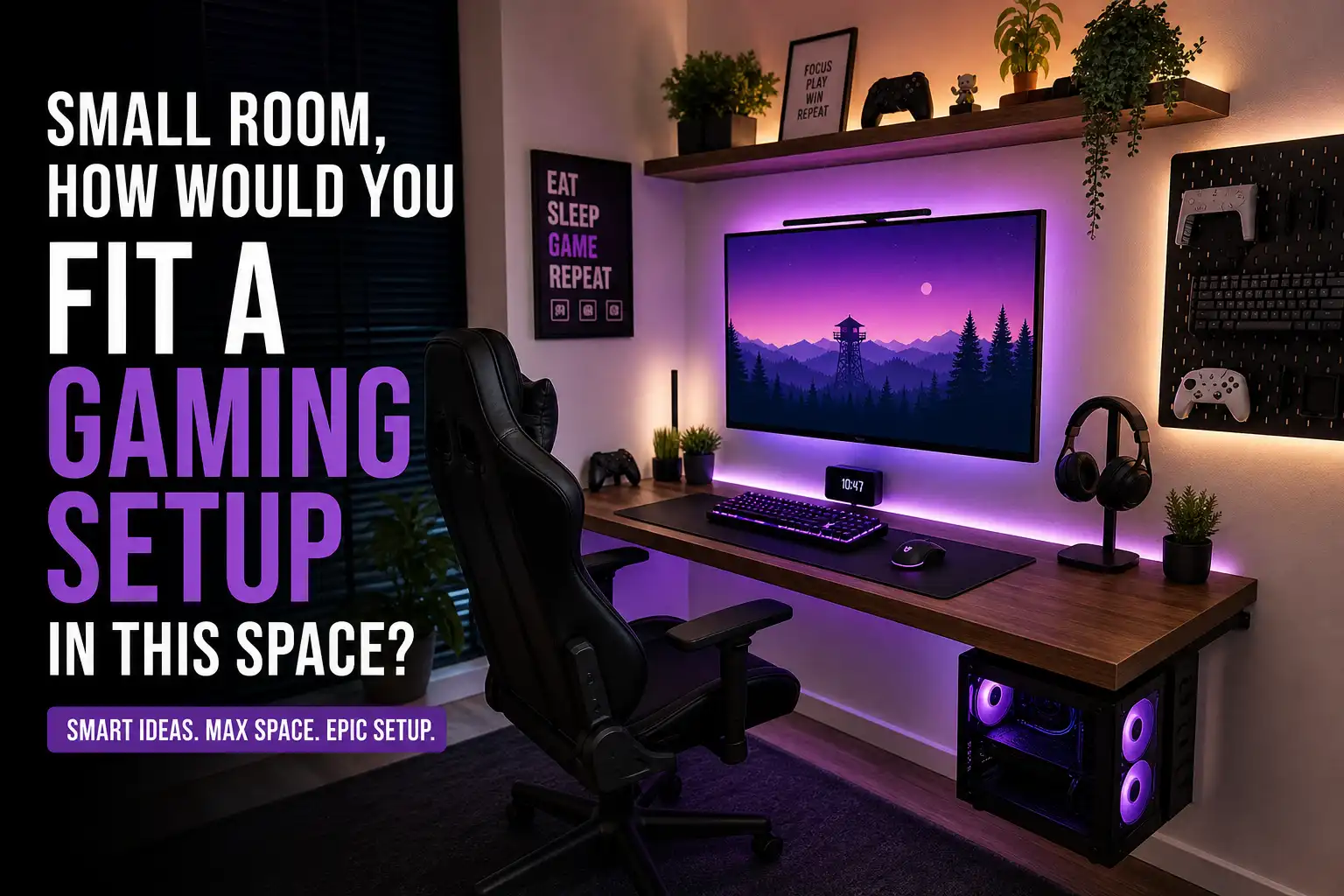
Introduction: When Space Is Tight, Strategy Matters
I’ve worked with some seriously small rooms, the kind where even a chair feels like a luxury. And if you’re trying to build a gaming setup in a tight space, it can feel impossible at first.
But here’s the truth: you don’t need a big room to create an amazing gaming setup, you just need a smart plan.
In my experience, the difference between a cramped mess and a clean, functional gaming space comes down to three things:
- How you use your walls
- How you choose your gear
- How you manage space vertically
Let me walk you through exactly how I would set up a gaming station in a small room — step by step.
See everything you need to know: How To Build a Gaming Setup On a Budget
Overview: Smart Setup Blueprint (Must-Follow Tips)
Create a cheap, space-saving gaming setup in a small room by utilizing corner desks, wall-mounting monitors, and adding floating shelves for storage. Maximize limited floor space with vertical organization, LED strip lighting for ambiance, and compact PC cases or under-desk PC mounts to keep surfaces clutter-free.
Space-Saving Furniture & Mounting
- Corner or small desks fit tight spaces perfectly
- Floating shelves store games and accessories
- Wall-mounted monitors free desk space completely
- Under-desk mounts keep PC cases and headphones out of the way
Affordable Decoration & Lighting
- LED strips add a clean gaming vibe
- DIY wall art or posters enhance aesthetics
- Cable management tools prevent clutter
Budget Equipment Ideas
- Compact PCs or Mini ITX builds
- Consoles placed on shelves
- Slim soundbars instead of large speakers
- RGB accessories for style on a budget
Layout Tips
- Use vertical space for storage
- Stick to a simple color theme
- Use curtains or panels to hide clutter
Start With Your Space (Most People Skip This)
Before buying anything, I always measure the space.
Even a difference between 60 cm and 70 cm desk depth can completely change comfort.
Here’s what I check:
- Wall width available
- Desk depth (minimum 60 cm recommended)
- Legroom clearance
- Height for shelves or mounts
👉 One mistake I see often is people forcing large furniture into small spaces — that’s where everything goes wrong.
Choose the Right Desk (This Changes Everything)
If I had to pick one thing that makes or breaks a small gaming setup, it’s the desk.
Best options I’ve tested:
1. Floating Desk (My Favorite)
- Mounted directly to the wall
- Saves leg space
- Looks clean and minimal
- Allows you to tuck your chair completely underneath
2. Corner Desk
- Perfect for awkward layouts
- Maximizes unused corners
- Gives more mouse movement space
3. Custom Desk
- Honestly, this is underrated
- A local carpenter can build a perfect-fit desk cheaply
- You control depth, width, and thickness
4. Compact Straight Desk
- Works if space is very tight
- Keep it slim and simple
👉 If your room is extremely small, I’d always go with a wall-mounted or custom desk.
Wall Mounting: The Ultimate Space Hack
This is where most small setups level up.
Instead of using desk space, I move things to the wall.
What I usually mount:
- Monitor (using a VESA wall mount)
- Shelves for accessories
- Sometimes even the PC case
Why it works:
- Frees up desk surface
- Creates a clean, minimal look
- Gives more room for keyboard and mouse
👉 In one setup I built, just mounting the monitor gave me almost double usable desk space.
🖥️ Pick the Right Monitor Size (Don’t Oversize It)
This is a mistake I’ve made myself.
Bigger isn’t always better in small rooms.
What I recommend:
- 24-inch monitor → best for tight spaces
- 27-inch monitor → balanced option
- 32-inch monitor → usually too big
If your desk depth is limited, a large monitor will feel too close to your face.
👉 In my experience, 24” is the sweet spot for comfort and space.
Go Compact With Your Hardware
Bulky setups don’t belong in small rooms.
Smart choices:
- Mini ITX PC (small form factor)
- Console setup (PlayStation/Xbox)
- Slim PC cases
You can also:
- Place the PC under the desk
- Mount it on the wall
- Put it on a shelf
👉 I’ve even seen setups where the PC is mounted beside the desk, looks clean and saves space.
Go Wireless & Reduce Clutter
Cables are the silent killer of small setups.
The more cables you have, the more cramped your setup feels.
What I always recommend:
- Wireless keyboard
- Wireless mouse
- Bluetooth headphones
Simple cable management tricks:
- Velcro ties
- Cable boxes
- Routing cables behind the desk
👉 Even basic cable cleanup can make your setup feel twice as big.
Smart Audio Choices (Skip the Bulky Stuff)
Speakers can take up a lot of room, especially subwoofers.
Better alternatives:
- Soundbar under the monitor
- Compact bookshelf speakers
- Headphones (best space-saving option)
👉 Personally, I prefer a soundbar or headphones in small setups, clean and efficient.
Use Vertical Space (Most People Ignore This)
If you’re not using your walls, you’re wasting space.
Here’s how I maximize vertical space:
- Floating shelves above the monitor
- Pegboards for accessories
- Wall hooks for headphones
- Storage for controllers and games
You can even add:
- Small plants
- Decorative items
- RGB elements
👉 Vertical setups make small rooms feel organized instead of crowded.
Lighting & Aesthetics (Make It Feel Bigger)
A good setup isn’t just functional — it should feel good too.
Budget-friendly ideas I’ve used:
- LED strips behind the desk
- Monitor light bar (saves desk space)
- RGB keyboard and mouse
- Posters or wall panels
Pro tip:
Stick to a single color theme (black, white, or neutral tones)
👉 This makes your setup look clean and less cluttered.
Layout Ideas That Actually Work
Here are a few layouts I’ve personally tested or seen work well:
1. Single Wall Setup
- Desk against one wall
- Monitor mounted
- Shelves above
👉 Best for extremely small rooms
2. Corner Setup
- L-shaped desk
- Monitor in the corner
- Accessories on both sides
👉 Great for maximizing awkward spaces
3. Closet Setup (Yes, Really)
- Desk inside closet space
- Shelves above
- LED lighting
👉 Surprisingly effective for ultra-tight rooms
Common Mistakes to Avoid
I’ve made some of these myself, learn from them:
- Choosing a monitor that’s too big
- Using bulky desks
- Ignoring cable management
- Placing PC on the desk unnecessarily
- Not using wall space
- Adding too many decorative items
👉 Small setups need simplicity, not clutter.
Final Thoughts: Small Space, Big Setup
A small room doesn’t limit your gaming experience, it just forces you to be smarter.
From everything I’ve tested and seen, the best small gaming setups follow a simple formula:
- Keep it minimal
- Use your walls
- Choose compact gear
- Stay organized
👉 If you apply even half of these ideas, your setup will feel bigger, cleaner, and more enjoyable.
And honestly? Some of the best gaming setups I’ve ever seen were built in the smallest spaces.
FAQs
How to make a gaming room in a small room?
Start by keeping things simple and space-efficient.
- Use a compact or wall-mounted desk to save floor space
- Mount your monitor on the wall instead of using a stand
- Choose a 24-inch or 27-inch monitor for comfort in tight spaces
- Go for wireless keyboard and mouse to reduce clutter
- Add floating shelves for storage instead of bulky furniture
- Use LED lighting to improve the vibe without taking space
👉 The key is to use vertical space and avoid oversized furniture.
What to put in a small game room?
You only need the essentials to make it functional and enjoyable:
- A desk and comfortable chair
- A gaming PC or console
- A monitor (preferably wall-mounted)
- Keyboard, mouse, or controller
- Headphones or a soundbar (to save space)
- Basic lighting like LED strips or a light bar
Optional additions:
- Small shelves
- Wall decor (posters, panels)
- Minimal accessories
👉 Keep it clean and avoid overcrowding the space.
What are some budget gaming room ideas?
You don’t need a big budget to build a great setup.
- Use a simple desk or DIY wooden board
- Install LED strip lights (cheap but effective)
- Decorate with posters or printed artwork
- Use Velcro ties for cable management
- Buy second-hand or entry-level gear
- Add floating shelves instead of cabinets
👉 Focus on smart choices, not expensive ones.
What are some affordable gaming setup options?
If you’re on a budget, here’s what works best:
- A Mini ITX or compact PC build
- A console setup (PlayStation or Xbox)
- A 24-inch monitor instead of larger screens
- Budget keyboard and mouse with RGB
- A soundbar instead of large speakers
👉 You can build a solid setup without spending too much if you choose compact and practical gear.
What is needed for a gaming room?
At minimum, you need:
- A gaming system (PC or console)
- A monitor or TV
- Input devices (keyboard/mouse or controller)
- A desk and chair
- Proper lighting
Nice-to-have extras:
- Headphones or speakers
- Shelves for organization
- Decorative lighting or wall art
👉 Start with the basics, then upgrade over time.
Does Ikea sell gaming stuff?
Yes, IKEA does offer gaming-related products.
They have:
- Gaming desks
- Ergonomic chairs
- Accessories like cable management tools
- Storage solutions and shelves
They also launched a gaming-focused line in collaboration with ASUS Republic of Gamers (ROG), which includes:
- Gaming desks
- Chairs
- Accessories for setup organization
👉 IKEA is a great option if you want affordable and space-saving furniture for your gaming setup.


 Mark Jones