 Elsa Addison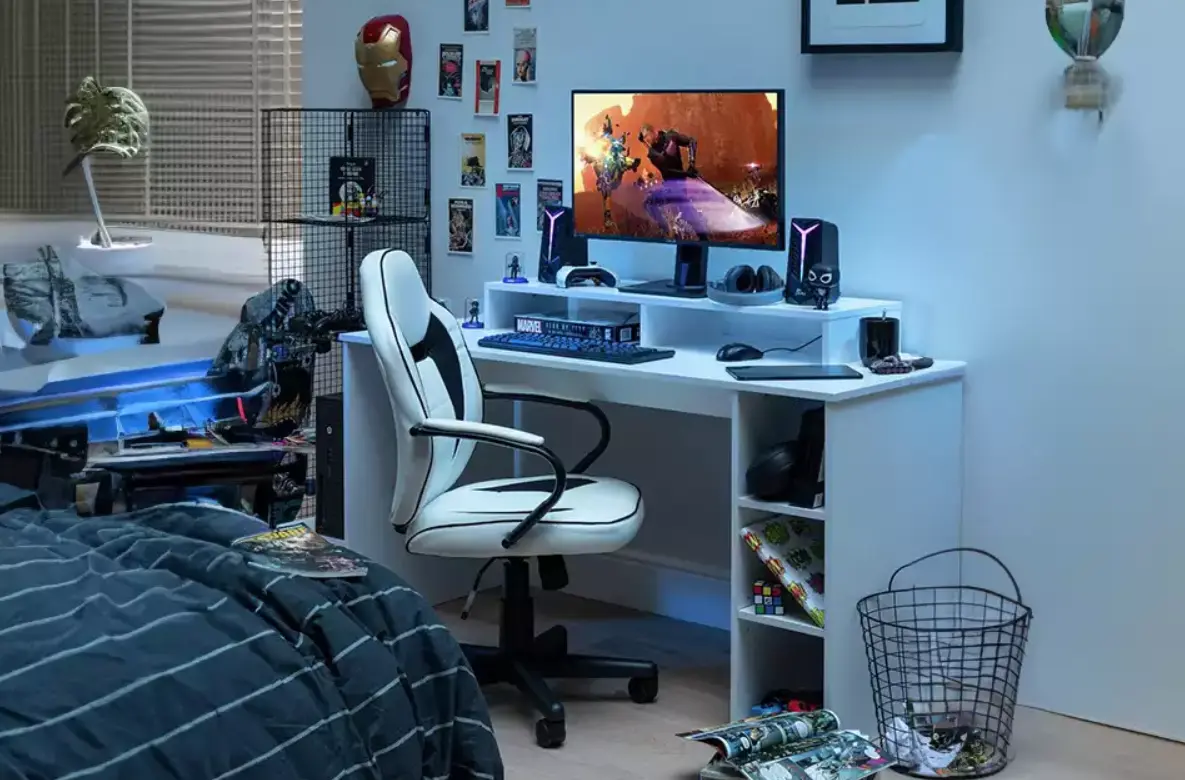
Creating a gaming setup in a small room can feel impossible at first. I’ve been there myself, trying to fit a gaming desk, chair, storage, and lighting into a tiny space without making the room feel crowded or chaotic.
The good news is that you really don’t need a huge bedroom or an expensive setup to create a cozy and functional gaming space. In my experience, small gaming rooms can actually feel more comfortable and immersive when they’re planned properly. What made the biggest difference for me was focusing on smart layout ideas, multifunctional furniture, vertical storage, and simple DIY upgrades instead of buying expensive gaming furniture.
In this guide, I’m sharing practical and cheap gaming setup ideas for small rooms that can help you maximize space, improve organization, and create a setup that feels clean, modern, and fun to use every day.
What a Small Gaming Room Really Needs
Before buying anything, I realized the most important step was figuring out exactly what the room needed to do.
A small room usually has to serve multiple purposes. Mine needed to work as:
- A gaming space
- A home office
- A relaxing bedroom
- A guest-friendly room
- A storage area without visible clutter
That completely changed how I approached the setup.
Instead of filling the room with bulky furniture, I focused on creating zones and keeping only the essentials.
One of the biggest mistakes people make in small gaming rooms is trying to copy huge RGB-heavy setups they see online. In reality, compact gaming setups work best when they stay simple and functional.
Start With a Minimalist Gaming Desk Setup
The desk is the center of every gaming room, so choosing the right one matters a lot.
In my experience, large gaming desks can overwhelm a small room very quickly. A slim desk or corner desk works much better because it keeps the footprint small while still giving enough space for your monitor, keyboard, and accessories.
Here are a few desk ideas that work especially well in small rooms:
- Wall-mounted desks
- Foldable desks
- Compact corner desks
- Floating desks
- Narrow IKEA desks
- Multi-purpose workstations
I also found that keeping the desktop clean instantly makes the room feel larger.
A few simple things helped:
- Wireless mouse and keyboard
- Monitor arm instead of monitor stand
- Under-desk cable trays
- Minimal decorations
Small upgrades like these made the setup feel far more organized without spending much money
Use Vertical Storage to Save Floor Space
One of the smartest things I added to my setup was vertical storage.
When floor space is limited, the walls become your best friend.
Instead of adding more furniture, I used:
- Floating shelves
- Pegboards
- Wall-mounted headphone hooks
- Mounted controller holders
- Small wall organizers
Pegboards are especially useful because they keep gaming accessories organized while also looking stylish.
I used mine to hold:
- Gaming headphones
- Charging cables
- Controllers
- Small decor items
- RGB remote controls
This helped free up desk space and made the room feel less cluttered immediately.
Floating shelves also worked great for storing:
- Games
- Consoles
- Speakers
- Collectibles
- Small plants
The biggest advantage is that they add storage without taking up any valuable floor area.
Keep the Color Palette Simple
One thing I noticed while researching small gaming room ideas is that too many colors can make a room feel visually crowded.
That’s why I decided to stick with a simple color palette.
Black, white, and gray work really well for gaming setups because they create contrast without making the room feel busy.
You can then add one accent color through:
- LED lighting
- Pillows
- Wall art
- Mouse pads
- Desk accessories
In my setup, I used blue LED strip lights behind the monitor and under the shelves. That single detail completely changed the atmosphere of the room without requiring expensive decor.
A tight color palette also helps everything look more cohesive and intentional.
Add LED Lighting Without Overdoing It
Lighting can completely transform a cheap gaming setup.
But honestly, too many RGB lights can make a small room feel overwhelming very fast.
I learned that soft ambient lighting works much better in compact spaces.
Some affordable lighting ideas that worked well for me include:
- LED strips behind the desk
- Lights under floating shelves
- Warm desk lamps
- Monitor backlighting
- Small neon signs
The key is creating atmosphere without turning the room into a nightclub.
In my experience, indirect lighting makes a small gaming room feel cozy and modern while reducing eye strain during long gaming sessions.
Create Zones Inside the Room
If your room also works as a bedroom or office, separating zones helps the space feel more organized.
This made a huge difference in my own setup.
Even in a tiny room, you can visually separate areas using:
- Rugs
- Accent walls
- Lighting
- Furniture placement
- Shelving
For example, I painted one wall darker behind the gaming desk to create a focal point. That instantly defined the gaming area without adding extra furniture.
You can also use floating shelves or narrow bookcases to subtly divide spaces while adding storage at the same time.
Upgrade Old Furniture Instead of Buying New
One of the best budget gaming setup tips I can give is this:
Don’t replace furniture too quickly.
A lot of old furniture can look completely different with simple DIY upgrades.
I personally saved a lot of money by:
- Painting old drawers matte black
- Adding LED strips to shelves
- Replacing handles on cabinets
- Using adhesive vinyl wraps
- Installing cable management clips
Even inexpensive upgrades can make basic furniture feel more modern and gaming-focused.
This approach is much cheaper than buying branded gaming furniture, which is often overpriced.
Use Multi-Purpose Furniture in Small Rooms
In small spaces, every piece of furniture should ideally serve more than one purpose.
That mindset helped me avoid clutter very quickly.
Some multifunctional furniture ideas include:
- Storage ottomans
- Foldable chairs
- Sofa beds
- Beds with drawers underneath
- Side tables with hidden storage
- Foldable gaming desks
I also found that compact furniture with open space underneath makes the room feel visually lighter.
Bulky furniture tends to make small rooms feel cramped much faster.
Cable Management Makes a Huge Difference
This is one detail many people ignore.
Messy cables can instantly make a gaming setup feel chaotic, especially in small rooms.
Once I organized my cables properly, the entire setup looked cleaner and more expensive.
Some cheap cable management ideas include:
- Velcro cable ties
- Cable sleeves
- Adhesive cable clips
- Under-desk trays
- Cable boxes
Even spending a few dollars on cable organization can completely improve the overall look of the setup.
Add Decor Without Creating Clutter
Gaming decor works best when it feels intentional.
Instead of filling the room with random accessories, I focused on a few meaningful pieces:
- Framed gaming posters
- Small figurines
- Minimalist wall art
- RGB lighting
- Cozy pillows
- Faux plants
Plants actually helped soften the gaming setup visually and made the room feel more balanced.
Since my room didn’t get much natural light, I used faux greenery instead of real plants.
That small touch added warmth without needing maintenance.
Cheap Gaming Setup Ideas That Give the Biggest Impact
If you’re working with a tight budget, these upgrades usually give the best results for the least money:
- LED strip lights
- Floating shelves
- Painted furniture
- Cable management kits
- Pegboards
- Wall-mounted headphone holders
- Minimalist desk organizers
- DIY wall art
- Monitor risers
- Under-desk storage baskets
Most of these upgrades are affordable but dramatically improve the appearance and functionality of a small gaming room.
Common Mistakes to Avoid in Small Gaming Rooms
After testing different layouts and setups myself, I noticed a few common mistakes that make small rooms harder to use.
Avoid these if possible:
- Oversized gaming desks
- Too many RGB lights
- Dark walls on every side
- Excessive decor
- Poor cable management
- Bulky furniture
- Blocking natural light
- Buying unnecessary accessories
Keeping things simple usually works much better in compact spaces.
Frequently Asked Questions
How do I make a small gaming room look bigger?
Use lighter wall colors, vertical storage, mirrors, floating furniture, and minimal clutter. Keeping the desk clean also helps the room feel more open.
What is the best desk for a small gaming room?
Corner desks, floating desks, and slim wall-mounted desks work best because they maximize floor space.
Are LED lights good for small gaming rooms?
Yes, but it’s better to use ambient LED lighting instead of extremely bright RGB setups. Soft lighting creates a cozy atmosphere without overwhelming the room.
How can I make a cheap gaming setup look expensive?
Focus on organization, cable management, cohesive colors, and lighting. A clean setup often looks more premium than an expensive but cluttered one.
Can a gaming room also work as a home office?
Absolutely. In fact, many small gaming setups work best when they’re designed as multi-purpose spaces with smart storage and compact furniture.
Final Thoughts
Creating a cheap gaming setup for a small room is really about being intentional with your space.
In my experience, the best setups are not necessarily the most expensive ones. They’re the ones that feel comfortable, organized, and practical for everyday use.
By using vertical storage, compact furniture, ambient lighting, and a clean layout, you can turn even the smallest room into a cozy gaming space without spending a fortune.
Start small, improve things gradually, and focus on functionality first. Once the setup feels organized and comfortable, the entire room starts to feel bigger, cleaner, and far more enjoyable to spend time in.


 Mark Jones