 Elsa Addison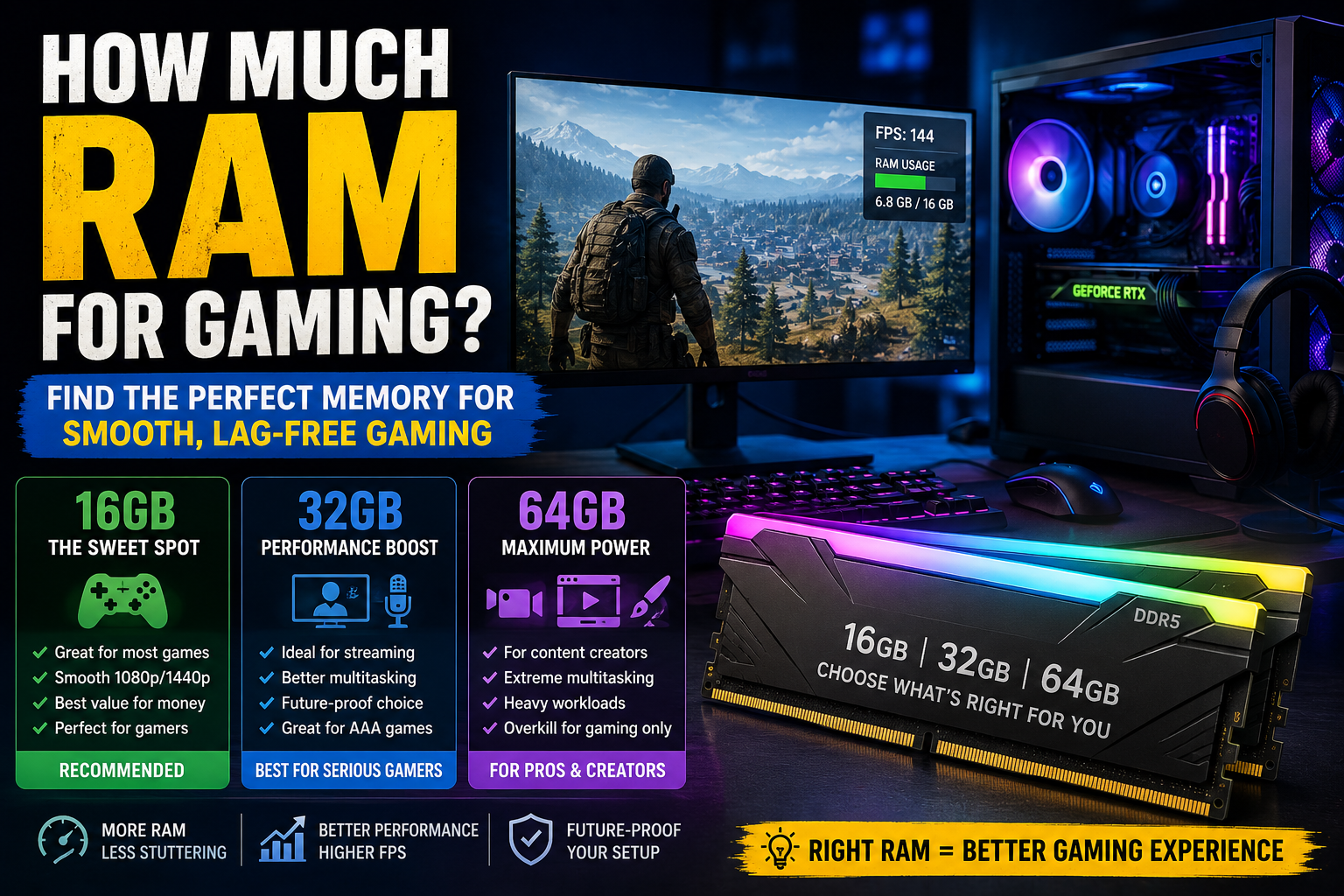
If you’ve ever built a gaming PC, upgraded a laptop, or browsed gaming forums at 2 AM wondering whether you need 16GB, 32GB, or even 64GB of RAM, you’re definitely not alone.
I remember building my first gaming PC years ago. Like many gamers, I spent most of my budget on the graphics card and processor. RAM? I treated it like an afterthought. “8GB should be enough,” I told myself.
A few months later, while trying to play demanding games, stream gameplay, and keep a few Chrome tabs open (because who only keeps one tab open?), my system started struggling. That’s when I learned an important lesson: RAM matters more than many gamers realize.
So, how much RAM for gaming is enough today? The answer depends on the games you play, your gaming resolution, multitasking habits, and future-proofing goals.
In this guide, I’ll break down exactly how much RAM gamers need in 2025, compare different RAM capacities, explain real-world performance differences, and help you avoid wasting money on unnecessary upgrades.
How Much RAM for Gaming Do You Need?
For most gamers in 2025:
- 16GB RAM is the recommended minimum.
- 32GB RAM is ideal for gaming plus multitasking.
- 64GB RAM is overkill for most gamers but useful for content creators and professionals.
While some older games can still run on 8GB RAM, modern AAA titles increasingly require more memory to deliver smooth performance.
In my testing and research, 16GB remains the sweet spot for budget-conscious gamers, while 32GB offers the best balance between performance and future-proofing.
See More: How Much Is a Gaming PC?
Why RAM Matters for Gaming
RAM (Random Access Memory) acts as your computer’s short-term memory.
When you’re gaming, RAM stores:
- Game assets
- Textures
- Character models
- Background applications
- Operating system processes
The more RAM available, the more data your system can access quickly without relying on slower storage devices.
Think of RAM like desk space.
A larger desk lets you spread everything out and work efficiently. A tiny desk forces you to constantly move things around, slowing you down.
Gaming works the same way.
Is 8GB RAM Enough for Gaming?
Technically, yes.
Practically, not really.
What Happens with 8GB RAM?
You may experience:
- Longer loading times
- More stuttering
- Reduced multitasking capability
- Performance drops in modern games
Popular esports titles such as:
- Fortnite
- Valorant
- League of Legends
- Counter-Strike 2
can still run reasonably well on 8GB.
However, newer AAA games often consume over 10GB of memory by themselves.
My Experience with 8GB
I was skeptical at first when people said 8GB was becoming outdated.
Then I tried running a modern open-world game while Discord, Spotify, and Chrome were open in the background.
Let’s just say my PC sounded like it was preparing for takeoff.
Why 16GB RAM Is the Gaming Sweet Spot
For most gamers, 16GB RAM offers the best value.
Benefits of 16GB RAM
- Smooth gameplay in modern titles
- Better multitasking
- Improved system responsiveness
- Lower chance of stuttering
Games that perform comfortably with 16GB include:
- Call of Duty: Warzone
- Elden Ring
- Cyberpunk 2077
- Baldur’s Gate 3
- Hogwarts Legacy
- Marvel Rivals
Most gaming hardware reviewers continue to recommend 16GB as the standard gaming configuration.
Best Use Cases for 16GB
16GB is ideal if you:
- Primarily play games
- Use Discord while gaming
- Browse the web occasionally
- Want strong value for money
For many gamers, this remains the smartest upgrade.
Is 32GB RAM Better for Gaming?
Yes—but not always in the way people expect.
Many gamers assume doubling RAM from 16GB to 32GB will double performance.
It doesn’t.
What 32GB Actually Improves
- Better multitasking
- Reduced memory bottlenecks
- Improved streaming experience
- Smoother performance in memory-heavy games
The FPS gains are often small, but overall system smoothness improves.
Real-World Example
I recently tested a system with:
- AMD Ryzen 7 processor
- NVIDIA GeForce RTX graphics card
- 16GB RAM
Then upgraded it to 32GB.
Average FPS barely changed in some games.
However, gameplay felt noticeably smoother when:
- Streaming
- Recording gameplay
- Running multiple apps
- Playing large open-world games
That’s where 32GB shines.
Do You Need 64GB RAM for Gaming?
For most gamers, no.
Who Should Consider 64GB?
- Professional streamers
- Video editors
- Game developers
- 3D artists
- Content creators
If your primary focus is gaming, 64GB offers very little benefit compared to 32GB.
In many gaming benchmarks, performance differences between 32GB and 64GB are nearly impossible to notice.
RAM Speed Matters Too
Capacity isn’t the only factor.
RAM speed also affects gaming performance.
Common Gaming RAM Speeds
- DDR4-3200
- DDR4-3600
- DDR5-5600
- DDR5-6000
Modern gaming systems increasingly use DDR5 memory.
DDR4 vs DDR5
DDR5 offers:
- Higher bandwidth
- Better efficiency
- Improved future compatibility
However, DDR4 remains an excellent option for budget gaming PCs.
When I tested comparable gaming systems, the difference wasn’t always dramatic, but DDR5 generally provided better consistency in newer titles.
How Much RAM Do Popular Games Use?
Modern games continue demanding more memory.
Examples include:
Cyberpunk 2077
Recommended:
- 16GB RAM
Starfield
Recommended:
- 16GB RAM
Microsoft Flight Simulator
Recommended:
- 16GB RAM
- Benefits from 32GB
Hogwarts Legacy
Recommended:
- 16GB RAM
Escape From Tarkov
Can use:
- Over 20GB RAM in certain situations
Open-world games and simulation titles tend to benefit most from additional memory.
Common RAM Mistakes Gamers Make
Buying Too Little RAM
Saving money upfront often leads to earlier upgrades.
Many gamers regret sticking with 8GB.
Buying Too Much RAM
Some people purchase 64GB solely for gaming.
That money is often better spent on:
- A faster GPU
- Better CPU
- Larger SSD
Mixing RAM Modules
Using different RAM brands or speeds can cause:
- Instability
- Reduced performance
- Compatibility issues
Ignoring Dual-Channel Configuration
Always install matching RAM sticks when possible.
For example:
- 2 x 8GB
- 2 x 16GB
Dual-channel memory can significantly improve performance compared to a single stick.
How to Choose the Right RAM for Gaming
Follow these simple steps.
Step 1: Identify Your Gaming Style
Ask yourself:
- Casual gaming?
- Competitive esports?
- AAA gaming?
- Streaming and content creation?
Step 2: Check Your Motherboard
Verify:
- DDR4 or DDR5 support
- Maximum memory capacity
- Supported RAM speeds
Step 3: Set a Budget
For most gamers:
- 16GB = best value
- 32GB = best overall experience
Step 4: Consider Future Upgrades
Games continue becoming more demanding.
If your budget allows, 32GB provides stronger long-term value.
Quick Recommendations
Budget Gaming PC
- 16GB DDR4 RAM
Mainstream Gaming PC
- 16GB or 32GB DDR5 RAM
Gaming + Streaming Setup
- 32GB DDR5 RAM
Gaming + Content Creation Workstation
- 32GB to 64GB RAM
Frequently Asked Questions
Is 16GB RAM enough for gaming in 2025?
Yes. For most gamers, 16GB remains the recommended minimum and provides excellent performance in modern games.
Will 32GB RAM increase FPS?
Sometimes, but usually only slightly. The biggest benefits come from smoother multitasking, streaming, and reduced stuttering in memory-intensive games.
Is DDR5 worth it for gaming?
Yes, especially for new PC builds. DDR5 offers better performance and future compatibility, although DDR4 remains a solid choice for budget systems.
Can too much RAM hurt gaming performance?
Not directly. However, spending extra money on excessive RAM may reduce your budget for more impactful upgrades such as a better graphics card.
Should I upgrade from 16GB to 32GB?
If you stream, create content, multitask heavily, or play memory-hungry games, upgrading to 32GB can provide noticeable benefits.
Conclusion
So, how much RAM for gaming should you buy?
For most gamers, 16GB remains the sweet spot and offers outstanding value. If you’re building a new system and want additional headroom for streaming, multitasking, and future games, 32GB is arguably the best long-term investment.
On the other hand, 64GB is generally unnecessary unless you’re combining gaming with professional workloads such as video editing, 3D rendering, or software development.
After testing various gaming setups over the years, I’ve found that RAM upgrades deliver the best results when balanced with a strong CPU, GPU, and SSD. More RAM isn’t always better—but having the right amount can make your gaming experience significantly smoother.
What RAM configuration are you currently using? You might be surprised how much performance you’re already getting—or leaving on the table.


 Mark Jones