 Elsa Addison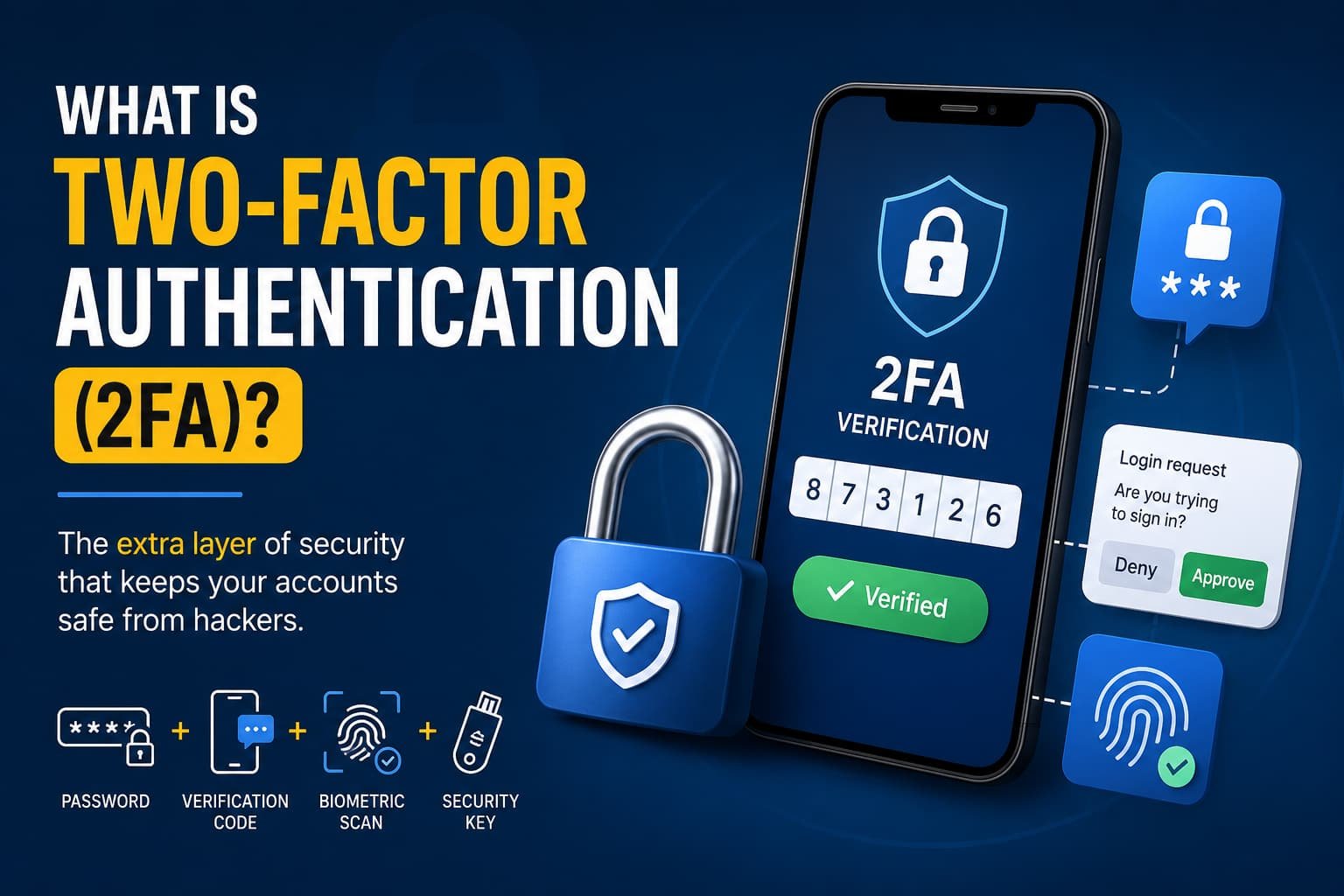
A few years ago, I logged into an old email account I hadn’t used in a long time. I expected nothing unusual, but I found login attempts from another country. That moment changed how I think about online security.
In my experience, most people only realize the importance of security after something goes wrong. That’s exactly where two-factor authentication (2FA) comes in. It acts like a second lock on your digital door, making it much harder for anyone to break in, even if they already have your password.
AI Overview (Updated & Embedded)
Two-factor authentication (2FA) is a security method that requires you to provide two different forms of identity verification to access an account. It goes beyond a simple password, ensuring that even if a hacker steals your login, they cannot access your data without the second factor.
How 2FA Works
When you log in, you must combine information from two of the following distinct categories:
- Knowledge: Something you know, like a password or PIN.
- Possession: Something you have, like a physical security key or your mobile phone.
- Inherence: Something you are, like a fingerprint or facial scan.
Common 2FA Methods
- Authenticator Apps: Apps like Google Authenticator or Microsoft Authenticator generate a temporary, time-sensitive code on your device.
- SMS Text Messages: The service sends a numeric code via text to your mobile phone.
- Push Notifications: You receive a prompt on your phone or tablet asking you to tap “Approve” to log in.
- Hardware Keys: Physical USB or NFC keys (such as YubiKeys) that you plug into your computer or tap against your phone.
What is Two-Factor Authentication (2FA)?
Two-factor authentication (2FA) is a security process that requires two separate forms of identity verification before granting access to an account.
Instead of relying only on a password, 2FA asks for a second proof of identity—like a code sent to your phone or a fingerprint scan.
This simple addition dramatically reduces the risk of unauthorized access, especially in a world where passwords are frequently stolen, leaked, or guessed.
See More: What is Cybersecurity and Why is It Important?
How 2FA Works in Real Life
When I first enabled 2FA on my accounts, the process felt slightly annoying—but I quickly realized how powerful it was.
Here’s what usually happens:
- You enter your username and password.
- The system asks for a second verification step.
- You confirm your identity using one of the following:
- A code from an authenticator app
- A push notification approval
- An SMS verification code
- A biometric scan
- A hardware security key
Once verified, access is granted.
The key idea is simple: even if someone steals your password, they still can’t get in without that second factor.
The Three Core Authentication Factors
2FA is built on three identity categories:
1. Something You Know
This includes:
- Passwords
- PIN codes
- Security questions
It’s the most common but also the weakest because it can be guessed or stolen.
2. Something You Have
This includes:
- Smartphones
- Authentication apps
- Hardware security keys
This factor is much harder for attackers to replicate.
3. Something You Are
This includes:
- Fingerprints
- Facial recognition
- Voice recognition
This is known as biometric authentication and is becoming more common on modern devices.
Common Types of 2FA Methods
Over time, I’ve noticed that not all 2FA methods offer the same level of security or convenience.
Authenticator Apps
Apps like Microsoft Authenticator generate time-based codes that refresh every 30–60 seconds.
They are more secure than SMS because they don’t rely on mobile networks.
SMS Verification Codes
A one-time code is sent to your phone via text message.
It’s easy to use but vulnerable to SIM swapping attacks.
Push Notifications
You receive a prompt asking you to approve or deny a login attempt.
In my experience, this is the fastest and most user-friendly method.
Hardware Security Keys
Physical devices like USB or NFC keys provide extremely strong protection.
They are often used in high-security environments.
Biometrics
Fingerprint or face scans are becoming standard on smartphones and laptops.
They are convenient, but depend on device security.
Why 2FA Matters More Than Ever
Cyber threats are no longer rare, they’re constant.
Attackers use techniques like:
- Phishing emails
- Credential stuffing
- Password leaks from data breaches
- Brute-force attacks
In my opinion, relying only on passwords today is like locking your house but leaving the key under the mat.
2FA adds a second barrier that makes most attacks useless.
Even if your password is stolen, the attacker still cannot proceed without your second verification method.
Key Benefits of Two-Factor Authentication
1. Stronger Account Security
Even weak passwords become safer when combined with a second factor.
2. Protection Against Phishing
Stolen credentials alone are not enough for attackers.
3. Reduced Risk of Data Breaches
It protects both personal and business accounts.
4. Compliance with Security Standards
Many organizations rely on frameworks like:
- ISO 27001
- NIST guidelines
- GDPR
- HIPAA
5. Better User Confidence
Knowing your account is protected adds peace of mind.
2FA vs MFA: What’s the Difference?
This is a common confusion point.
- 2FA (Two-Factor Authentication): Requires exactly two factors
- MFA (Multi-Factor Authentication): Uses two or more factors
In simple terms:
All 2FA is MFA, but not all MFA is 2FA.
Organizations often prefer MFA because it adds extra layers of protection for sensitive systems.
How Businesses Use 2FA for Security
From an enterprise perspective, 2FA is not optional anymore—it’s essential.
Companies use systems like Microsoft Entra ID and Microsoft Authenticator to enforce secure sign-ins across employees.
They often:
- Require 2FA for remote access
- Protect admin accounts with stronger authentication
- Apply rules based on risk level or location
In my experience studying enterprise systems, the biggest advantage is control, businesses can enforce security without completely disrupting user experience.
Best Practices for Using 2FA
If you’re setting up 2FA, here’s what I recommend based on practical usage:
- Always add a backup method (like recovery codes)
- Use authenticator apps instead of SMS when possible
- Secure your phone with a lock screen
- Don’t approve login requests you didn’t initiate
- Update recovery options regularly
These small steps make a big difference in long-term security.
The Shift Toward Passwordless Security
One of the most interesting trends I’ve seen is the move toward passwordless authentication.
Instead of passwords, systems now use:
- Biometrics
- Passkeys
- Device-based authentication
Even in passwordless systems, the idea of multiple verification factors still exists—it just becomes more seamless.
This shift is slowly making traditional passwords less relevant.
Conclusion:
If there’s one thing I’ve learned from studying and using different security systems, it’s this: most hacks don’t happen because systems are weak, they happen because access control is weak.
Two-factor authentication is one of the easiest and most effective ways to protect yourself online. It doesn’t require technical skills, expensive tools, or complex setup.
Just a few minutes of setup can prevent serious damage later.

 Mark Jones